


The fastest Shopify themes, judged by how they perform for real shoppers, are Taiga, Baseline, Stretch, Maranello and the free theme Ride: in Shopify's own Core Web Vitals data (updated 10 November 2026), 96.7% to 98.0% of stores using them passed all three speed metrics. But the gap between a "fast" and an "average" Theme Store theme is small, and the apps, scripts and images you add usually decide how fast your store really is.
This guide replaces our old list of fast loading Shopify themes. Most themes on it (Flex, Turbo, Brooklyn, Simple, Minimal, Boundless, Debutify) are no longer sold on the Shopify Theme Store, and the load times we quoted came from one-off lab tests. Here's a more honest way to judge theme speed, and the themes that come out on top. If you need a recap first, see what a Shopify theme is.
How to judge Shopify theme speed
Speed claims on theme listings and "fastest Shopify theme 2020"-style lists are hard to compare. These four sources are what we use.
1. Your own store's Core Web Vitals in the Shopify admin
Shopify shows a web performance summary on the Themes page: from your Shopify admin, go to Online Store > Themes. It's based on real visitors over the last 30 days and rates three Core Web Vitals as Good, Moderate or Poor:
- Largest Contentful Paint (LCP), loading speed. Good is 2.5 seconds or less.
- Interaction to Next Paint (INP), responsiveness to taps and clicks. Good is 200 milliseconds or less.
- Cumulative Layout Shift (CLS), how much the page jumps around. Good is 0.1 or less.
Click any metric to open its report, or go to Analytics > Reports and search for "contentful", "next" or "cumulative". Data can lag by up to 36 hours and only covers the last 90 days. A store in private mode (password protected) has no real-user data. For more on these metrics, see our guide to Core Web Vitals on Shopify.
2. Shopify's real-user data by theme
Shopify's performance team publishes Core Web Vitals results by theme. For each theme it shows the percentage of stores where at least 75% of visits had good LCP, CLS and INP. It only counts active stores with a custom domain, at least 100 views a day, and one of the theme's three latest versions. This is the best public evidence for comparing theme speed, because it reflects real shoppers on real stores rather than a demo.
3. The Theme Store's performance requirement
Every theme on the Shopify Theme Store has to meet Shopify's theme requirements, including a minimum average Lighthouse performance score of 60 across the home, product and collection pages, on desktop and mobile, tested with real images and content. Images must also load only as they're needed. So any Theme Store theme starts from a tested baseline. Themes bought elsewhere don't.
4. PageSpeed Insights
PageSpeed Insights gives you two kinds of data. Field data comes from the Chrome User Experience Report (CrUX), real Chrome users over the previous 28 days, if your page has enough traffic. Lab data comes from a Lighthouse test that simulates one page load on a mid-range phone. Lab scores move around from run to run and are best for finding what to fix; field data is what reflects your customers. Our Lighthouse quick tip shows how to audit a theme with it.
The fastest Shopify themes in real-user data
These are the themes with the highest share of stores passing all three Core Web Vitals in Shopify's data. The table compares speed pass rate, developer and price, as of 27 November 2026 (speed data updated 10 November 2026).
| Theme | Developer | Price | Speed pass rate |
|---|---|---|---|
Woolman |
$500 |
98.0% |
|
Switch |
$420 |
97.6% |
|
Stretch |
Maestrooo |
$400 |
97.0% |
Truly Fine Pixels |
$320 |
96.8% |
|
Shopify |
Free |
96.7% |
|
Ascent |
Webvista Studio |
$320 |
96.6% |
OpenThinking |
$370 |
96.1% |
|
Krown Themes |
$380 |
96.0% |
Prices are from each theme's Theme Store listing. "Speed pass rate" is the share of qualifying stores on that theme where at least 75% of visits passed LCP, CLS and INP.
Some context so you don't over-read the ranking:
- Across all 100 themes Shopify listed, the median pass rate was 91.5%. Most popular themes sit between 89% and 95%.
- A theme with fewer stores can rank higher or lower partly because of who uses it. Brands that pay $500 for a speed-focused theme may also be more careful with apps.
- The ranking changes with every data update, so check the live table before you buy.
Taiga Shopify theme
Taiga topped Shopify's data, with 99.5% of stores passing LCP, 99.0% CLS and 99.5% INP. It costs $500, comes with five presets (Taiga, Bubbly, Meadow, Hehku and Askel), and the Theme Store lists its tagline as "A sleek, performance-ready theme that keeps sales flowing". As of 27 November 2026 it had 55 reviews, 100% positive, and was on version 9.0.0 (19 October 2026).
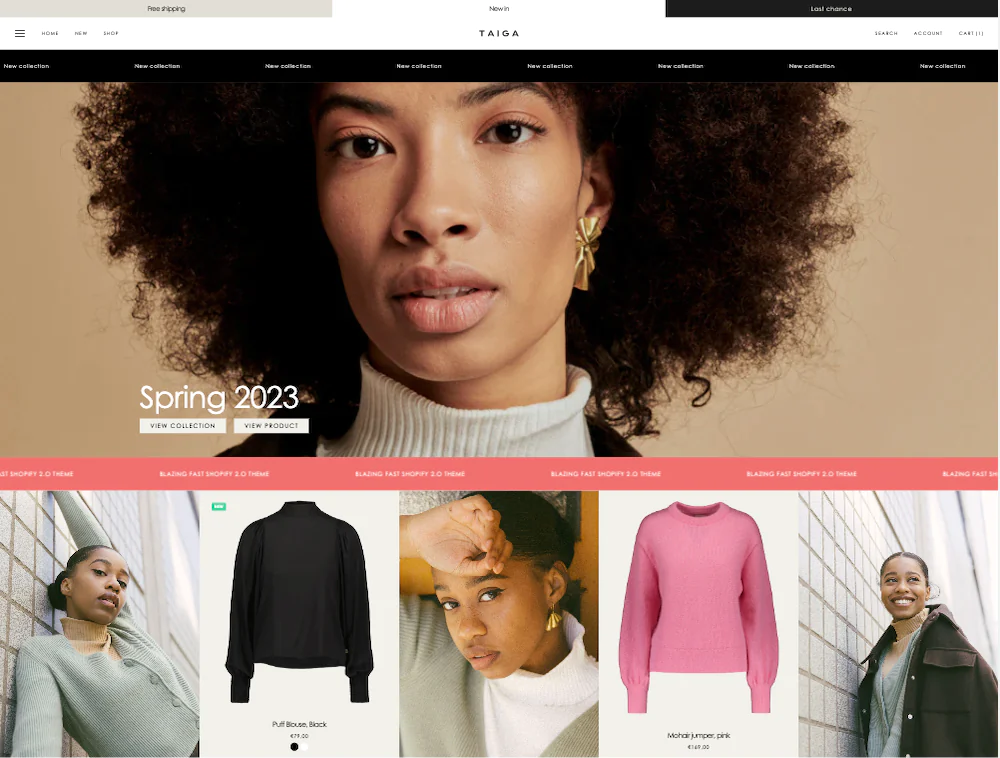
Features include color swatches, swatch filters, quick view, quick buy, a mega menu, product filtering and sorting, infinite scroll, a stock counter, pre-order, 10+ video sections and EU translations (English, French, Italian, German and Spanish). It's designed with fashion, jewelry and other image-led brands in mind. At $500 it's at the very top of Theme Store prices, so it makes most sense if speed and visual control both matter to you.
The fastest free Shopify themes
Shopify's help center says all its Horizon family themes and Online Store 2.0 themes by Shopify are free and optimized for web performance. The data mostly backs that up. This table compares the fastest of Shopify's free themes, plus Dawn and Horizon, by speed pass rate (data updated 10 November 2026).
| Theme | Speed pass rate |
|---|---|
96.7% |
|
Rise |
95.2% |
95.1% |
|
95.1% |
|
95.0% |
|
94.8% |
|
Ritual |
94.8% |
Vessel |
94.1% |
92.6% |
|
Horizon |
90.1% |
Across all of Shopify's free themes in the data, pass rates ranged from 88.9% (Dwell) to 96.7% (Ride), around the 91.5% median for all themes. The differences are small, so the fastest free Shopify theme for you is usually the one whose layout fits your products, because you'll add fewer apps and custom sections to make it work. Our best free Shopify themes guide compares them on design and features, and free vs paid themes covers when paying makes sense.
One limit: stores on the Starter plan can only use the Spotlight theme. On Basic, Grow and Advanced you can add up to 20 themes; on Plus, up to 100.
What happened to the themes on our old list
If you found this page looking for a theme we used to recommend, here's where each stands as of 27 November 2026:
- Brooklyn, Simple, Minimal, Boundless: Shopify's vintage free themes. They're no longer in the Theme Store and only get security fixes. Stores still on them show pass rates of 81% (Boundless) to 92% (Brooklyn), but you can't add new sections to every page. Move to an Online Store 2.0 or Horizon theme when you next redesign.
- Flex and Turbo: no longer on the Shopify Theme Store; Out of the Sandbox sells them on its own site. Shopify recommends installing themes only from the Theme Store, because themes from elsewhere aren't vetted for quality or compatibility, and Shopify's theme update feature doesn't support themes bought outside the Theme Store.
- Debutify: was never a Theme Store theme.
- Kingdom: still on the Theme Store ($280, Krown Themes, 97% positive from 210 reviews). It isn't in Shopify's speed data, so we can't rank it.
Why apps and images matter more than your theme
Picking a fast theme helps, but on its own it won't keep a store fast. Shopify lists the biggest factors as your theme, the apps you've installed, and any third-party code you've added, including tag managers and the tags inside them. In our experience, a slow store is usually slow because of what was added on top of the theme.

Apps
Each app that loads scripts on your storefront adds weight. Two facts worth knowing:
- Apps with the Built for Shopify badge must not reduce your storefront's Lighthouse performance score by more than 10 points. Other apps have no such limit.
- Uninstalling an app doesn't automatically remove its code from your theme. Leftover snippets keep loading until someone deletes them. Ask the app developer how to remove it fully.
Go through your apps once a quarter and remove anything that isn't paying for itself. Our list of Shopify apps that actually increase sales can help you decide what stays. Audit your tag manager the same way.
Images and video
Shopify's image CDN resizes and compresses images and serves modern formats like WebP, so you don't need a compression app for that. What you still control is how many images and videos load at the top of each page, and how big your originals are. Our guide to the best size for Shopify product images has the numbers.
Sections, animations and collections
Shopify's own advice for any theme:
- Don't stack too many sections on one template. High section counts lower performance.
- Compare speed before and after turning on page transitions or animations.
- Turn on pagination for big collections so fewer products load at once.
What Shopify already handles
Third-party speed tools often recommend adding a CDN, enabling compression or setting browser caching. Shopify already does all of these: a Cloudflare CDN, gzip compression, one-year browser caching and automatic CSS and JavaScript minification. Skip those recommendations and focus on apps, images and code you added.
For a step-by-step cleanup, see how to optimize Shopify page loading speed.
How to test a theme's speed before you buy
- Check the theme in Shopify's real-user data table. Anything above about 90% is in line with most Theme Store themes.
- From your admin, go to Online Store > Themes, click Add themes > Visit Theme Store, find the theme and click Try theme. You can preview up to 19 paid themes at once.
- Set up the trial theme with your real products, images and the apps you plan to keep. A demo store with no apps tells you little.
- Preview it and run the home, collection and product pages through PageSpeed Insights a few times. Compare the lab results with your current theme set up the same way.
- After you publish, watch the web performance summary on the Themes page for a few weeks. Real-user data takes time to build up.
What to do next
- If your store's LCP, INP or CLS is Moderate or Poor in Online Store > Themes, start with an app and script audit before switching themes.
- If you're on a vintage theme, plan a move to a current free or paid theme; you'll get speed improvements and sections on every page.
- If you're choosing a premium theme, compare speed alongside features and price. Our Expanse theme review shows how a large-catalog theme scores, and our guide to Shopify theme cost explains what you get for the money.
- When you switch, follow our guide to updating your Shopify theme without losing anything.






 Request to Join