A Shopify MCP server lets Claude (or ChatGPT) pull your store's data and act on it through tools instead of exports. Shopify has its own connector for Claude. Composio is the option we use when a job needs more than Shopify: one MCP server that connects Shopify, Google Analytics 4, Search Console, Meta Ads, Google Ads, Klaviyo, Microsoft Clarity, Gmail and Sheets, so one prompt can build a weekly report from all of them.
This guide covers what Composio is, how to connect it to a Shopify store, the Shopify permissions that decide what your reports can see, a sample weekly report, eight more reports worth automating, what it costs, and the security record you should read before you connect anything. Every product fact was checked on Composio's, Shopify's and Anthropic's own pages on 29 November 2026.
What Composio is (and what MCP means for a Shopify store)
MCP, the Model Context Protocol, is the standard way AI assistants connect to outside tools. A connector, or MCP server, gives Claude a set of tools it can call: "get orders with filters", "run report", "search analytics query".
Composio is a company that runs those connections for you. Its docs describe it as a way to "connect users to 1,500+ apps", and it has two products:
| Product | Who it's for | What you get |
|---|---|---|
Composio For You |
Store owners and teams using Claude or ChatGPT |
One connector at https://connect.composio.dev/mcp that reaches all your apps |
Composio Platform |
Developers building their own agents or apps |
An SDK, per-user connections and event triggers |
For a Shopify store, you want For You. Instead of loading hundreds of tools into Claude, the connector exposes 7 "meta-tools": Claude searches for the tool it needs, asks you to connect an app the first time, then runs up to 50 tool calls in one step. The first time Claude needs an app, Composio gives you a sign-in link; after that, the connection stays.
Shopify MCP options compared
Composio isn't the only way to connect Shopify to an AI assistant, and for some stores it isn't the best one.
| Option | Covers | Best for | Watch out for |
|---|---|---|---|
Shopify's Claude connector |
Shopify only |
Store questions, products, orders and analytics in Claude |
Doesn't reach GA4, Klaviyo or your ad accounts |
Composio |
Shopify plus 1,500+ apps |
Reports that mix Shopify with marketing and analytics data |
You set up your own Shopify app; see the security section |
Zapier MCP |
9,000+ apps through Zapier |
Stores already running on Zapier |
Each tool call uses Zapier tasks |
Pipedream MCP |
3,000+ apps |
Developers who want hosted MCP per app |
More technical to set up |
Shopify's UCP, Catalog and Checkout MCPs |
Your storefront, for shoppers' AI agents |
Letting ChatGPT or Gemini shop your catalog |
Not for reporting on your own store |
Our view: if your questions start and end in Shopify, use Shopify's connector, which we cover step by step in our guide to running your Shopify store with Claude. Add Composio when a report needs data Shopify doesn't have, such as sessions from GA4, queries from Search Console, ad spend from Meta, or email revenue from Klaviyo. The storefront MCPs are a different job: they're how shoppers' AI agents find and buy your products, which we cover in making your Shopify store agent-ready.
How we use Composio at heycarson
heycarson.com isn't a Shopify store, so we don't run Shopify reports on ourselves. We do use Composio every week for the same kind of work a store would: pulling data from several tools into one answer.
- Google Analytics 4: traffic by channel, landing pages and AI assistant referrals (chatgpt.com, perplexity.ai and others).
- Google Search Console: queries in positions 4 to 15, pages losing clicks, and sitemap status.
- Bing Webmaster Tools: sitemaps, crawl errors and top pages, which matter because ChatGPT search leans on Bing's index.
- Gmail, Google Sheets and Google Drive: saving results to a sheet and drafting the summary email.
The pattern carries straight over to a Shopify store: Claude pulls from each tool, joins the numbers, flags what changed and writes it up. The difference is that a store adds Shopify, ad platforms and email tools to the mix.
Which tools to connect for Shopify reporting
These are the Composio toolkits that matter most for a Shopify store, with the size listed on each toolkit page on 29 November 2026.
| Tool | Composio toolkit | What it adds to a store report |
|---|---|---|
Shopify |
386 tools |
Orders, refunds, customers, inventory, products and ShopifyQL reports |
Google Analytics 4 |
82 tools |
Sessions, channels, landing pages, conversion rate |
Google Search Console |
14 tools |
Search queries, clicks, impressions, position, URL inspection |
Meta Ads |
99 tools |
Spend, purchases and ROAS by campaign |
Google Ads |
78 tools |
Spend and conversions by campaign |
Klaviyo |
233 tools |
Campaign and flow revenue, list growth |
Microsoft Clarity |
1 tool |
Dead clicks, rage clicks and scroll depth (last 1 to 3 days only) |
Google Sheets |
50 tools |
A running log of every week's numbers |
Gmail and Slack |
61 and 165 tools |
Sending the finished report to the team |
The Shopify tool that does the most work in reports is "Run Shopify analytics query", which runs a ShopifyQL query and returns a compact table. That's the same query language behind Shopify's own analytics reports, so sales by product, channel or day come back in one call instead of paging through orders.
How to connect Shopify to Claude with Composio
Step 1: Add Composio as a custom connector
In the Claude desktop app, click + in the message box, then Connectors > Add connector > Add custom connector. Name it Composio, paste https://connect.composio.dev/mcp and click Add. On claude.ai, it's Customize > Connectors > + Add > Add custom connector. Claude opens a browser window where you sign in to Composio.
Custom connectors work on every Claude plan, but Free users can add only one. On a Team plan, only Owners and Primary Owners can add them; members then connect their own accounts. In Claude Code, Composio has a plugin: /plugin marketplace add ComposioHQ/composio-plugin-cc, then /plugin install composio@composio.
Step 2: Create your own Shopify app for the connection
This is the step that trips people up. Composio's Shopify page says plainly: "Shopify requires connections to go through your own OAuth app." You create an app for your store in the Shopify Dev Dashboard, then add its client ID and secret in the Composio dashboard. Composio handles sign-in and token refresh from there.
When you add the store, Composio's guide says to enter only the store name (your-store-name), not the full .myshopify.com address. The old way of copying an admin API token from a custom app no longer works for new apps.
Step 3: Choose the Shopify permissions carefully
The scopes you give the app decide what every report can see. Start read-only.
| Scope | What it allows | Why it matters |
|---|---|---|
read_orders |
Orders created in the last 60 days |
Fine for weekly reports, useless for last year |
read_all_orders |
Adds older orders (needs read_orders too) |
Needed for year-over-year and Black Friday comparisons |
read_reports |
ShopifyQL analytics queries |
The fastest way to get sales tables |
read_products, read_inventory |
Catalog and stock levels |
Stock alerts and product reports |
read_customers |
Customer records |
Repeat-customer and cohort reports; skip it if you don't need it |
If an order call returns a 403 error, Composio's guide says to check read_all_orders first. An app in your own merchant organization can add that scope without asking Shopify; a Partner app has to request approval.
Leave out every write_ scope until you have a reason to add one. The Shopify toolkit includes tools that create orders, refund, cancel and "permanently delete an order from Shopify", and a read-only app makes those impossible, whatever the prompt says.
Step 4: Connect your other tools
Ask Claude to connect each app the first time you need it ("connect my Google Analytics through Composio"), or connect them all at once under Connect Apps in the Composio dashboard. Google tools use your Google sign-in; Klaviyo and Meta Ads accept OAuth or an API key; Clarity needs an API token from your Clarity project settings.
A weekly Shopify report, built by Claude
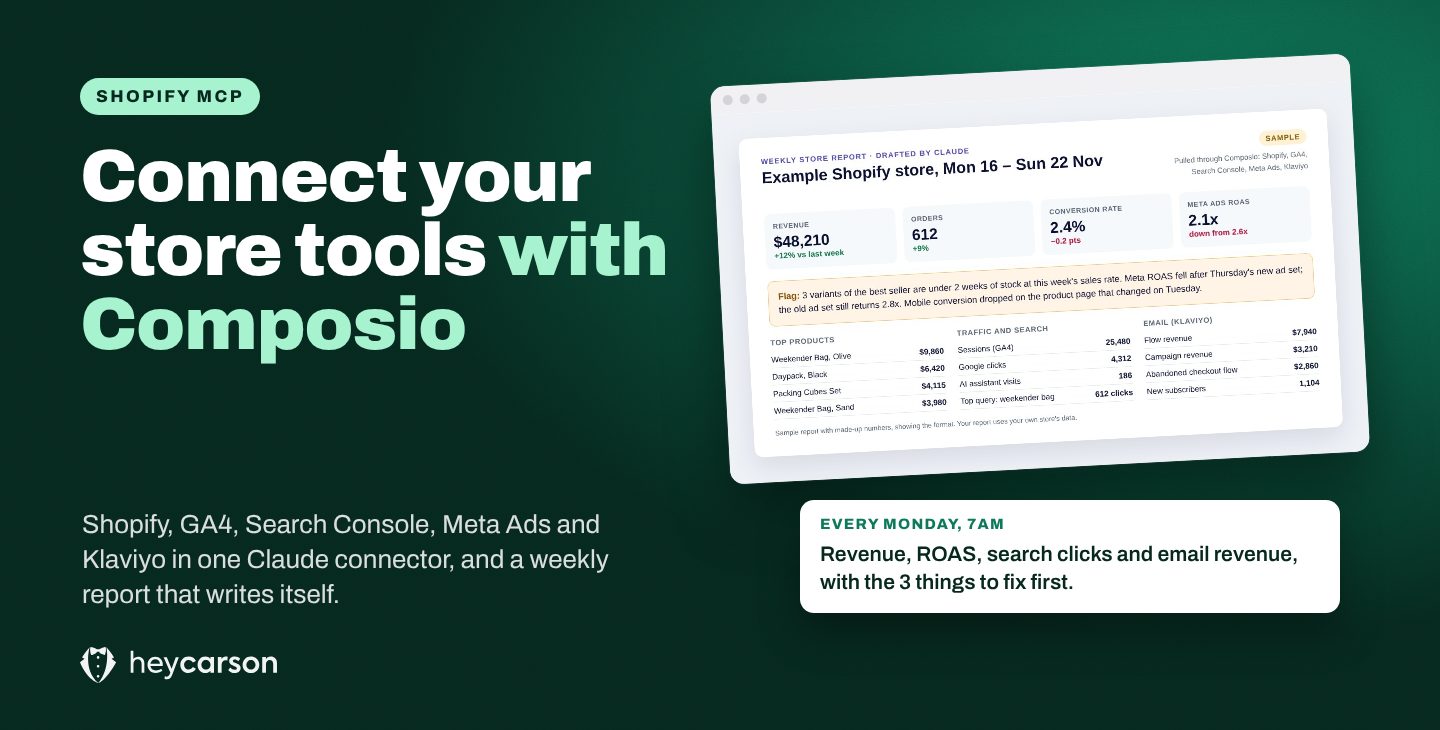
Here's the kind of report one prompt produces once Shopify, GA4, Search Console, Meta Ads and Klaviyo are connected. The store and every number in it are a sample, made up to show the format; heycarson isn't on Shopify, so we can't show you our own.
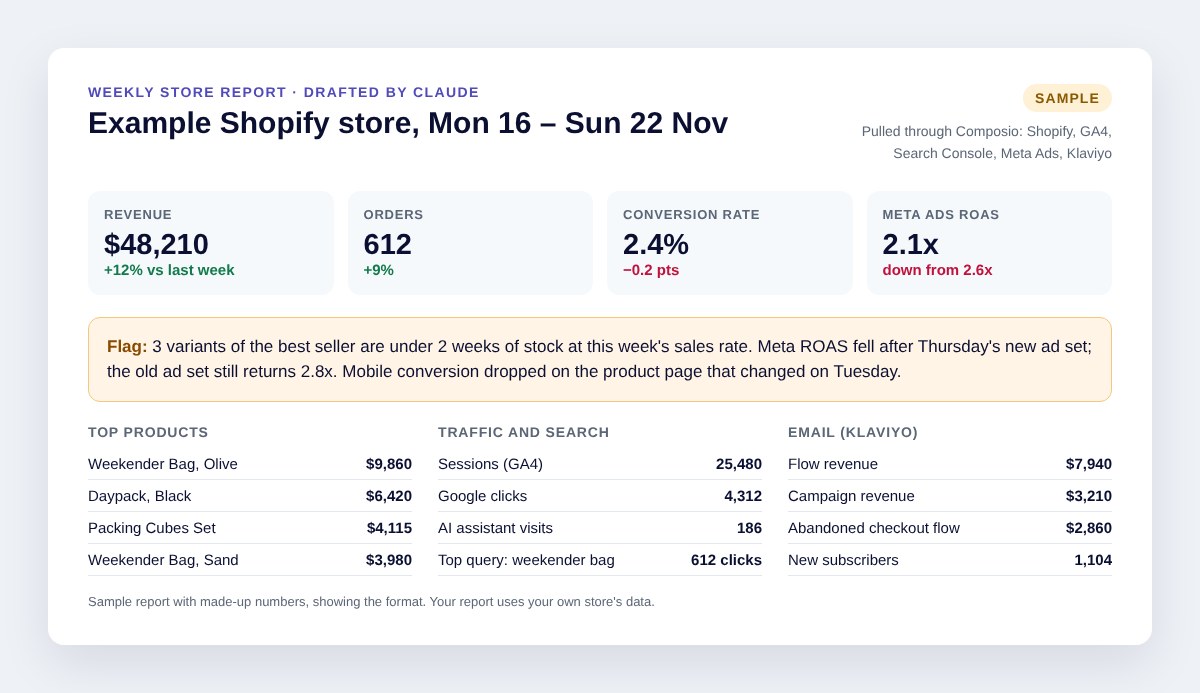
The prompt behind it:
Using Composio, build last week's store report (Monday to Sunday) and compare it with the week before.
- Shopify: revenue, orders, AOV, refunds and the top 5 products by revenue (use a ShopifyQL analytics query). Flag any top-20 product with less than 14 days of stock.
- GA4: sessions and conversion rate by device and channel, including AI assistant referrals.
- Search Console: clicks and impressions, plus the 5 queries that gained or lost the most clicks.
- Meta Ads: spend, purchases and ROAS by campaign.
- Klaviyo: revenue from campaigns and from flows. Put the three things that need action at the top. Don't change anything in any tool. Add this week's numbers as a new row in the "Weekly report" sheet.
A few things make the difference between a useful report and a confident-sounding mess:
- Say "don't change anything". It costs nothing and backs up your read-only scopes.
- Fix the date range. "Monday to Sunday, last week" gives the same window every run; "the last 7 days" shifts depending on when it runs.
- Expect numbers not to match. Shopify counts orders, GA4 counts sessions and Meta counts attributed purchases. Ask Claude to label each number with its source instead of reconciling them.
- Keep a running sheet. A row per week in Google Sheets gives Claude history to compare against and you a record if a number looks wrong.
Running it every Monday
Composio's own triggers fire on events, such as a product being updated, and send them to a developer's webhook; they don't run reports on a schedule. The schedule comes from Claude. In Claude Cowork, scheduled tasks run "hourly, daily, weekly, on weekdays, or manually", can use your connected tools, and keep running when your computer is asleep. They're on all paid plans (Pro, Max, Ultra, Team and Enterprise). Set the weekly report for Monday at 7am and it's waiting when you start work.
One catch: if a Composio tool is set to "Always ask" in Claude, a scheduled run may wait for an approval no one gives, or skip that tool. Allow the read tools a report needs, and keep "Always ask" for anything that writes.
8 more Shopify reports worth automating
| Report | Tools | Cadence |
|---|---|---|
Low-stock alert: best sellers with under 14 days of cover at current sales |
Shopify |
Daily |
Refund watch: refund rate by product, with the reasons customers gave |
Shopify |
Weekly |
Ad efficiency: spend and ROAS by campaign, with Shopify revenue alongside |
Meta Ads, Google Ads, Shopify |
Weekly |
SEO movers: product and collection pages that gained or lost the most search clicks |
Search Console |
Weekly |
AI referrals: visits and orders from chatgpt.com, perplexity.ai, gemini.google.com and copilot.microsoft.com |
GA4 |
Monthly |
Email performance: flow revenue vs campaign revenue, and which flows dropped |
Klaviyo |
Weekly |
Page friction: pages with the most rage clicks and dead clicks |
Clarity |
Every 2 days |
Discount check: orders and margin by discount code, with any code used far more than expected |
Shopify |
Weekly |
The Clarity report runs every two days for a reason: Composio's single Clarity tool exports data for "the previous 1–3 days" only, so a weekly run would miss most of the week. If you want a weekly view of Clarity, save each run to a sheet and let Claude add them up.
The AI referrals report pairs well with the work in our GEO guide for Shopify brands: if assistants start naming your products, this is where it shows up first.
What Composio costs a Shopify store
Composio's For You plans, as listed on 29 November 2026:
| Plan | Price | Tool calls | Notes |
|---|---|---|---|
Free |
$0 |
10,000 a month |
Up to 3 members, $2 of one-time credits, calls stop at the limit |
Standard |
$18 per seat a month ("Coming soon") |
10,000 per seat, then $0.005 per call |
Adds a firewall, SSO and zero data retention |
Enterprise |
Custom |
Custom |
Composio counts one action, such as reading a report or sending an email, as one tool call. A weekly report like the sample above uses a few dozen calls, and a daily stock alert a handful, so a store running everything in this guide stays well inside the free 10,000.
The bigger cost is Claude. Scheduled tasks need a paid Claude plan, and long reports use more of your plan's usage. On top of that, your Shopify plan's API limits still apply: Shopify's GraphQL Admin API refills at 100 points a second on standard plans, 200 on Advanced, 1,000 on Plus and 2,000 on Enterprise. That's plenty for reports, but a bulk pull of every order ever placed is better done with the toolkit's bulk query tool than with thousands of single calls.
Security: what to know before you connect your store
Connecting Shopify through any third party means that company holds a token for your store. Here's what Composio says, and what happened.
- How it stores credentials: "Provider credentials are encrypted at rest with AES-256-GCM." Claude gets the results of each call, not your tokens. In Composio's cloud, Composio holds the credentials.
- Certifications: Composio says it is "SOC 2 Type II attested and ISO 27001:2022 certified". The reports sit in its Trust Center, which we couldn't review, so treat that as Composio's claim.
- The May 2026 breach: Composio disclosed that "an attacker accessed internal Composio systems and compromised customer credentials". It put the leaked connections at about 0.3% of active connections, and separately named 5,241 API keys as possibly exposed. Afterwards it moved to envelope encryption with AWS KMS, stopped returning tokens through its APIs and brought in outside security firms for reviews.
- Data retention: zero data retention, where Composio doesn't store your tool call inputs and outputs, comes with the Standard plan, which isn't available yet. On Free, assume call data passes through Composio.
What we'd do on any store:
- Give the Shopify app read scopes only, and only the ones your reports use.
- Use a separate Shopify app for Composio, so you can revoke it in one click without touching anything else.
- Keep "Always ask" on any tool that writes, sends or deletes, in every tool you connect, not just Shopify.
- Don't connect customer data you don't report on. If no report uses customer records, leave out
read_customers. - Review connections monthly in the Composio dashboard and Shopify's app settings, and remove anything unused.
If your store handles sensitive data or you're on Shopify Plus with a security team, ask them before connecting any third-party MCP server, Composio included. Shopify's own connector keeps the connection between Shopify and Anthropic.
Our take
For a Shopify store, Composio is the easiest way we've found to get one report from five tools without building anything. The free plan covers a store's reporting easily, the setup is an hour including the Shopify app, and Claude's scheduled tasks turn it into a Monday report that writes itself.
It's not the first thing we'd connect, though. Start with Shopify's own Claude connector for store questions. Add Composio when your reports need GA4, Search Console, ads or email in the same answer, keep the Shopify side read-only, and go in knowing about the May 2026 breach. For more ways to put Claude to work on a store, see our Claude skills for Shopify.