Generative engine optimization (GEO) is the work of making your store easy for AI assistants such as ChatGPT, Gemini, Perplexity, Copilot and Google's AI Overviews to find, understand and recommend. For a Shopify brand, it comes down to three things: product data an assistant can read, pages that answer the questions buyers ask, and mentions on sites those assistants trust.
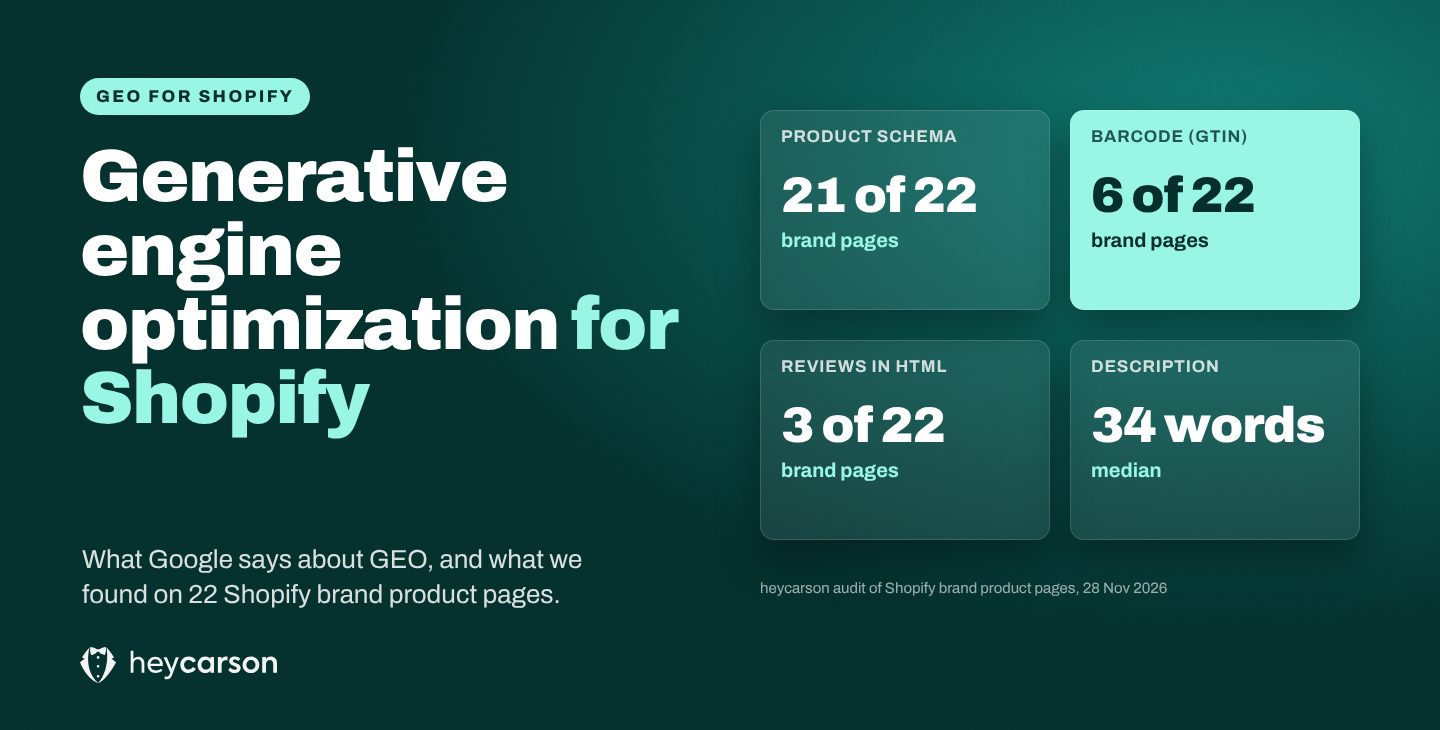
To see where Shopify brands stand, we checked one product page from each of 22 well-known Shopify brands on 28 November 2026. Almost all had basic product structured data. Few had the details that help an assistant choose one product over another: only 6 included a barcode (GTIN), only 3 had reviews in the page's HTML, and 15 had a product description under 50 words. This guide shows what we found, what Google actually says about GEO, and the eight steps we'd take on any Shopify store.
What is generative engine optimization?
Generative engines are AI tools that write an answer instead of listing links. When someone asks ChatGPT "what are the best travel bags for a weekend away?", it reads sources, picks products and explains why. GEO is about being one of those products, or one of the sources it quotes.
For Shopify brands, the places that matter most are:
| Where | How it finds products |
|---|---|
ChatGPT, Copilot, Gemini |
Shopify's agentic storefronts send your catalogue to them, plus what they read on the web |
Google AI Overviews and AI Mode |
Google's search index and your Merchant Center product feed |
Perplexity |
Its own crawler (PerplexityBot) and web search |
Claude |
Web search and pages it can read |
Shopify's agentic storefronts are covered in detail in our agentic commerce guide. The short version: your products can already appear in AI chats, but how well they show up depends on the data behind them.
Is GEO just SEO with a new name?
Mostly, and Google says so. Its guide to generative AI features in Search states that "optimizing for generative AI search is optimizing for the search experience, and thus still SEO." Google's AI Overviews and AI Mode run on its normal index and ranking systems. The same guide is blunt about shortcuts: you "don't need to create new machine readable files, AI text files, markup, or Markdown to appear in Google Search," Google ignores llms.txt, and there's no special schema for AI.
Two things change for Shopify brands, though:
- Product data carries more weight. Google's guide points ecommerce sites to Merchant Center feeds so products can appear in AI responses. AI shopping answers compare products on price, availability, materials, sizes and reviews, so missing details mean you can't be compared.
- Other assistants aren't Google. ChatGPT, Perplexity and Claude use their own crawlers and data. They can only use what's in your page's HTML or your feeds.
Our take: treat GEO as SEO plus product data. The brands we checked mostly have the SEO basics. What they miss is the product detail.
What we found on 22 Shopify brand product pages
On 28 November 2026 we fetched one product page from each well-known Shopify brand whose catalogue we could read (22 of the 29 brands in our storefront audit; the other 7 use custom storefronts or blocked us). We read what's in the page HTML, which is what most AI crawlers see.
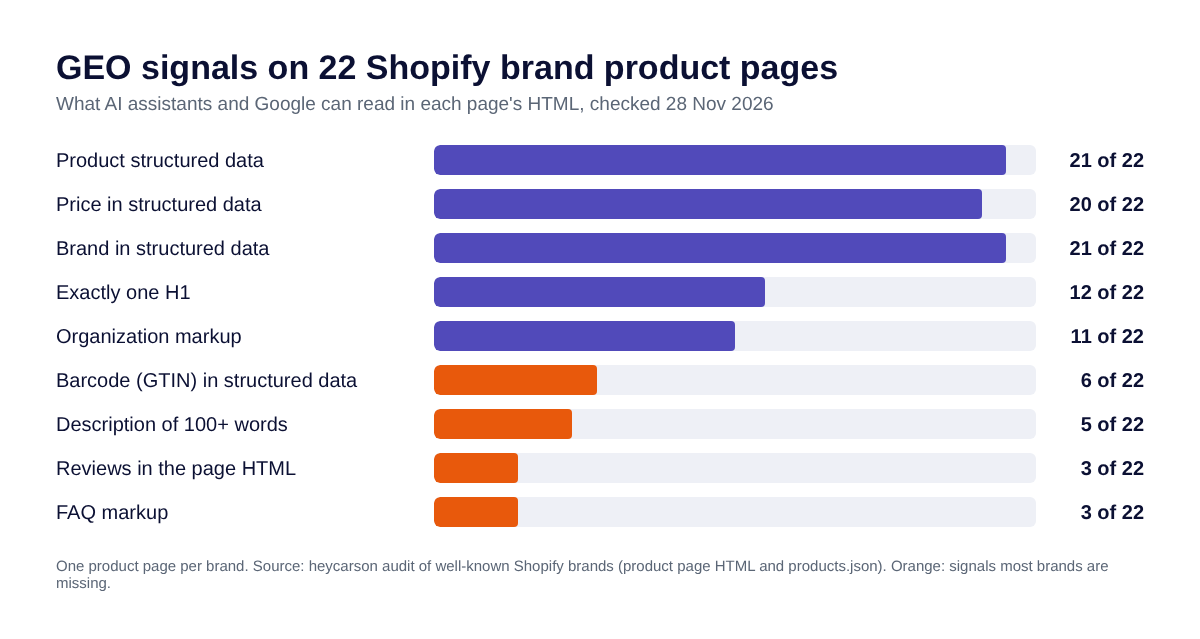
This table lists each signal and how many of the 22 pages had it.
| Signal | Pages | Why it matters for AI answers |
|---|---|---|
Product structured data |
21 |
Names the product, price and stock |
Price in structured data |
20 |
Lets assistants compare on price |
Brand in structured data |
21 |
Ties the product to your brand |
Exactly one H1 |
12 |
A clear page topic |
Organization markup |
11 |
Who the brand is |
Barcode (GTIN) |
6 |
Matches your product across sites and feeds |
Description of 100+ words |
5 |
Enough detail to answer a buyer's question |
Reviews in the page HTML |
3 |
Social proof a crawler can read |
FAQ markup |
3 |
Questions and answers in a readable format |
What stood out:
- Shopify gets the basics right for you. Product, price, brand and availability come from the theme, which is why almost every page had them. The one page without product data was Brooklinen's.
- Barcodes are the biggest gap. Only Chomps, UNTUCKit, Beis, TRUBAR, Rothy's and Kotn included a GTIN. A barcode is how Google and shopping engines know your product is the same one a review site or marketplace mentions.
- Reviews mostly load with JavaScript. Only Rothy's (188 reviews), tentree (383) and Salt & Stone (54) had review ratings in the HTML. Most review apps add stars after the page loads, which many AI crawlers never see.
- Descriptions are short. The median product description field held 34 words, and 15 of the 22 were under 50 words. Some brands put details in tabs or metafields we didn't count, but a short main description gives an assistant little to quote.
- Only 3 pages marked up FAQs: Olaplex, Chomps and TRUBAR.
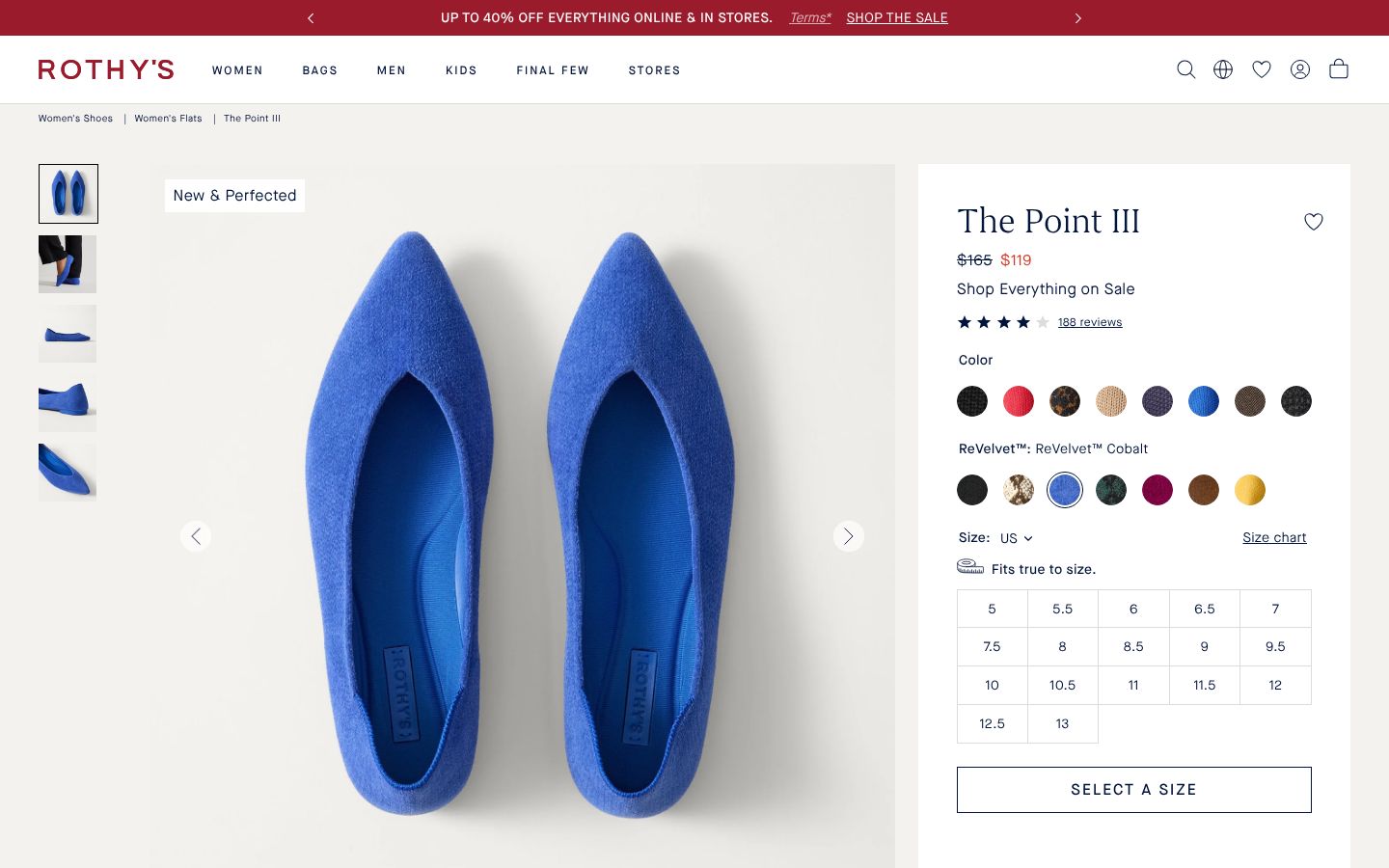
Rothy's was the most complete product page we checked: price, brand, barcode and its 188 reviews were all in the HTML.
From our earlier storefront check of the same brands: none of the 29 blocked AI crawlers in robots.txt, 26 had a UCP profile for AI shopping agents, and 21 served Shopify's default llms.txt. So access isn't the problem. Product detail is. The full data and the script are in our repository so the check can be repeated.
How to do generative engine optimization on Shopify: 8 steps
1. Make sure AI crawlers and Google can reach you
Check that your robots.txt doesn't block GPTBot, OAI-SearchBot, ClaudeBot, PerplexityBot or Google-Extended, unless you've decided to. In Search Console, confirm your site is included in Google's generative AI features, which Google lists as a requirement. Then fix anything that stops pages being indexed with a snippet.
2. Complete your product data, starting with barcodes
Add GTINs (barcodes) to every variant in Shopify, plus brand, product category and the category metafields Shopify offers (material, colour, size, age group). Use metafields for anything else a buyer compares on. Then send the same data to Google through the Google & YouTube app so Merchant Center has it. This is the single biggest gap in our audit.
3. Write descriptions that answer buyer questions
An assistant can only quote what's on the page. Aim for a description that covers what it is, who it's for, what it's made of, how it fits or works, how to care for it and how it differs from your other products. That usually takes 150 to 300 words, not 30. Our Shopify SEO guide covers product page copy in more depth.
4. Put reviews where crawlers can see them
If your review app only adds stars with JavaScript, assistants that don't run JavaScript won't see them. Check your product page source for aggregateRating. If it's missing, look for a review app that outputs review structured data in the HTML or syncs ratings to Shopify's product review metafields. Our product review app rankings compare the options.
5. Answer questions on the page
Add a short FAQ section to product and collection pages with the questions customers actually ask: sizing, shipping, ingredients, compatibility. Google says no special schema is needed for AI features, but clear question-and-answer text helps buyers and gives every assistant a direct answer to lift.
6. Build pages for "best X for Y" questions
AI shoppers ask comparison questions: "best running shoes for flat feet", "safest baby bottles". Collection pages and buying guides that answer those questions, with your products in context, give assistants a page to cite. Our audit found 15 of 22 brands relied on short product pages alone.
7. Earn mentions on sites assistants trust
AI answers lean on what independent sites say: reviews, roundups, niche publications and forums. Pitch real stories, offer products for honest reviews, and make sure your brand is described the same way everywhere. Google warns that seeking inauthentic mentions won't help, so skip paid link schemes.
8. Keep your llms.txt and agent files accurate
Shopify already serves llms.txt, agents.md and a UCP profile on every Online Store. Google ignores llms.txt, but other AI tools may read it. A custom file like Chomps' (below) points assistants to your best collections and guides. See our llms.txt guide and our free skill for an agent-ready Shopify store.
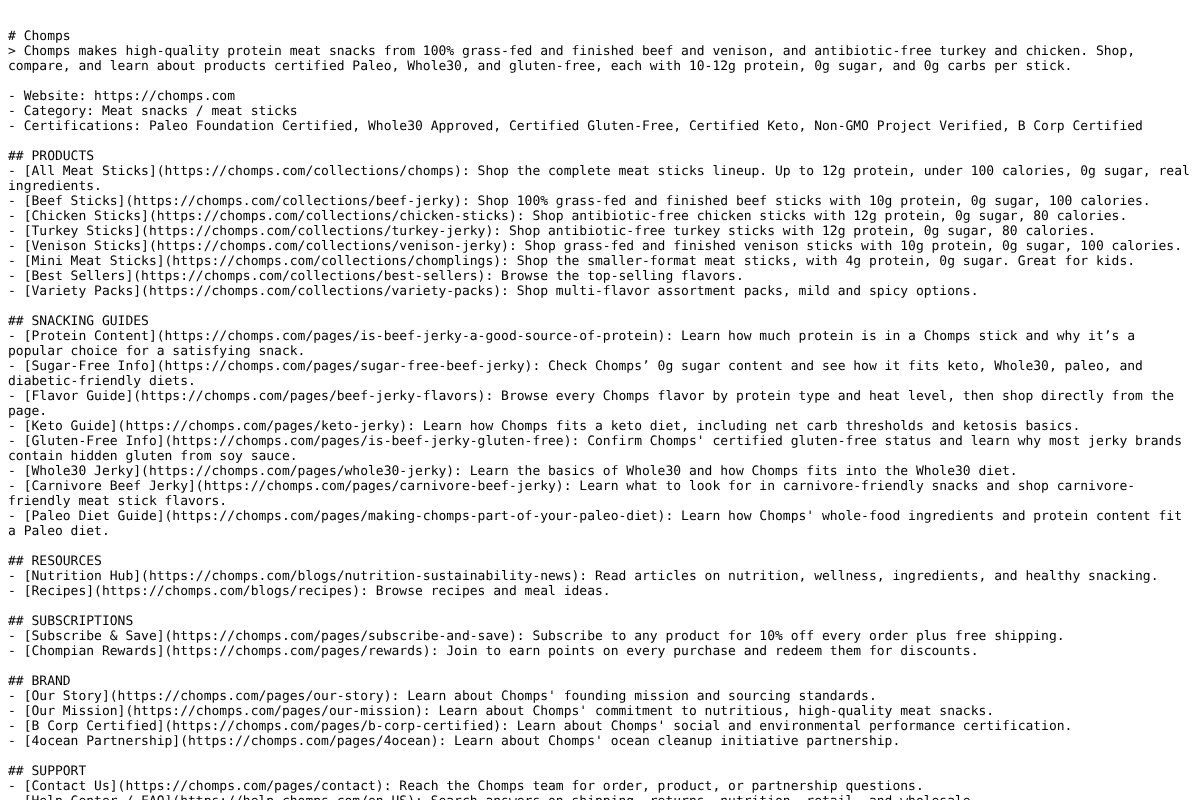
Chomps is one of only 3 of the 29 brands we checked with a custom llms.txt. It lists its collections, nutrition guides and certifications.
How do you measure GEO on Shopify?
- Search Console: Google's Generative AI performance report shows how your content performs in AI features in Search and Discover.
- Google Analytics and Shopify analytics: look at referral traffic from chatgpt.com, perplexity.ai, gemini.google.com and copilot.microsoft.com. On our own site, ChatGPT shows up as
chatgpt.com / ai-assistantin GA4. - AI answer tracking: pick 20 to 30 buyer questions for your category and check every month whether assistants name you and your competitors. Tools like Mangools' AI Search Watcher automate this.
- Product data coverage: track the share of products with a barcode, a 150-word description and reviews in the HTML. These are the numbers you control.
Google also warns that "no third-party tool has access to our internal ranking or AI systems," so treat any tool's "AI score" as an estimate.
Common GEO mistakes on Shopify
- Blocking AI crawlers by accident with a copied robots.txt rule or an app.
- Treating llms.txt as a shortcut. It helps some tools find pages; it doesn't make thin pages recommendable.
- Leaving barcodes blank because the store doesn't sell on marketplaces.
- Relying on JavaScript-only reviews that crawlers can't read.
- Writing for AI instead of buyers. Google says there's no need to rewrite content for AI or chop it into tiny pieces.
- Chasing fake mentions. Inauthentic mentions don't help, and they can hurt.
Video: "ChatGPT Just Added Shopping - How to Make AI Recommend YOUR Products" by MyWifeQuitHerJob Ecommerce Channel.
Where to start this week
Pick your 20 best-selling products. Add barcodes and the missing category details, check that reviews appear in the page source, and rewrite any description under 100 words to answer the questions customers ask most. Then pick 20 buyer questions and record which brands assistants name today, so you have a starting point to measure against. If you want help, our team can do it with you.